MyFundedFutures copy trading rules, 2026
MyFundedFutures allows copy trading on every account type and names its own copier partner. At live, the accounts you copied are merged into one.
Read from MyFundedFutures’ help center on 6 October 2026.
We are a competing prop firm, so read our comparison at the end with that in mind. Everything before it is MyFundedFutures’ own documentation, linked at the bottom.
Yes, MyFundedFutures (MFFU) allows copy trading across all account types, with Tradesyncer as its preferred copier and the Tradovate group copier as an alternative. Bots are allowed if they are not high-frequency and do not exploit simulated fills. Two limits shape any copy setup: MFFU takes no responsibility and offers no reset when a copier fails, and at live, your Sim Funded accounts are merged into one account.
In short
- Copiers: allowed on all account types. Tradesyncer is the preferred partner; the Tradovate group copier and external tools are allowed.
- Your risk: no support, no troubleshooting and no reset for copy trading issues, and you indemnify MFFU.
- Limits: 10 evaluations; 5 Sim Funded on 25K and 50K sizes, 3 as soon as a 100K or 150K is active, lower caps on Rapid EOD and Builder.
- Bots: allowed with your own settings; no HFT, no strategies built on simulated fills.
- The merge: at live, Sim Funded accounts become one Live account, and sim accounts go dormant.
Does MyFundedFutures allow copy trading?
Yes, and on every account type. MFFU’s copy trading page opens with the sentence most traders are looking for:
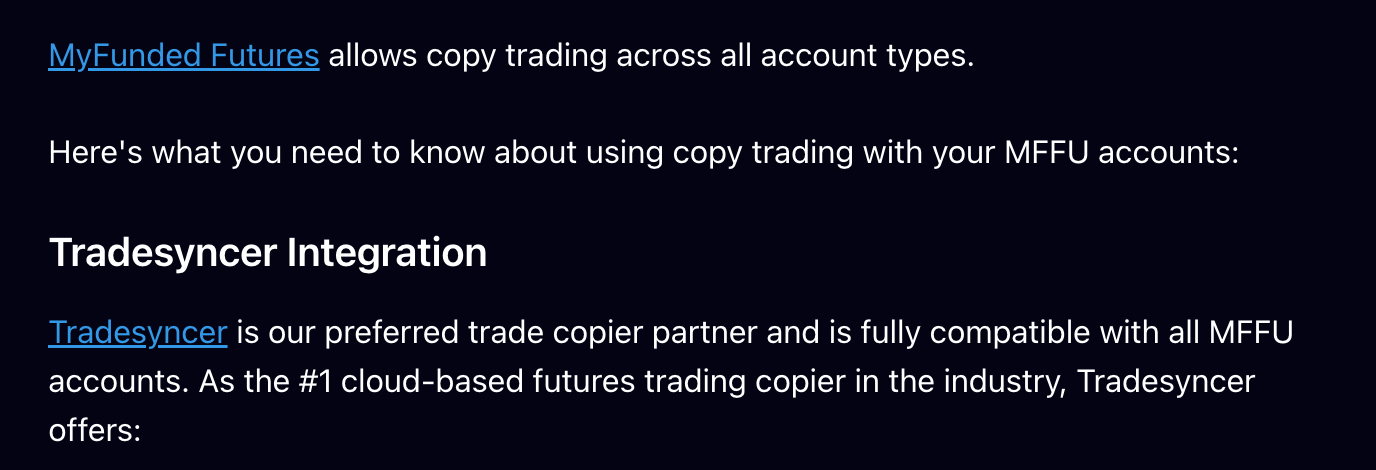
In MFFU’s words, that is every account type. In practice, copying ends at live, where your accounts merge into one. It is still the broadest permission in this series: no firm we reviewed states it more simply.
Tradesyncer, the Tradovate copier, or your own tool
MFFU names three routes, and treats all three the same way when something goes wrong.
The same page ends with a section titled Important Policies, and it is the part to read before you connect anything:
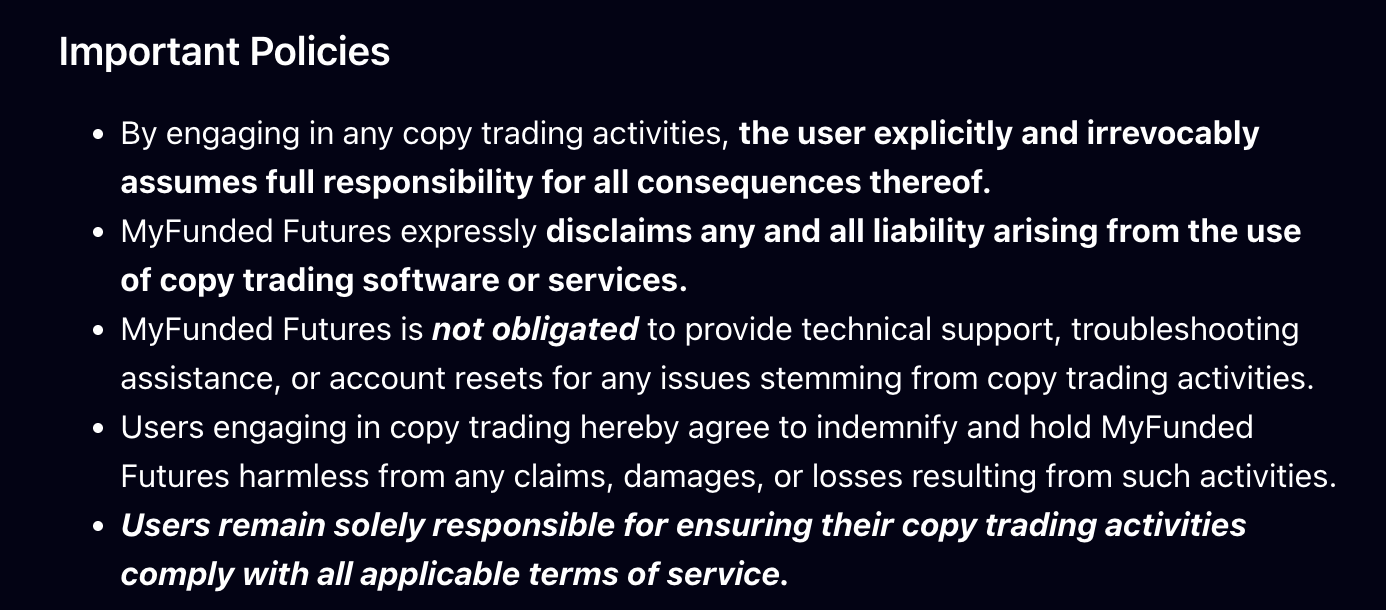
A partner is not a guarantee. Even with Tradesyncer, MFFU’s preferred partner, the trader “explicitly and irrevocably assumes full responsibility”, MFFU disclaims all liability, and it is not obligated to provide technical support, troubleshooting or account resets for issues stemming from copy trading. Do not count on a reset after a missed exit breaches an account.
How many MyFundedFutures accounts can you copy trade?
The answer depends on account size and plan, and one 100K changes it.
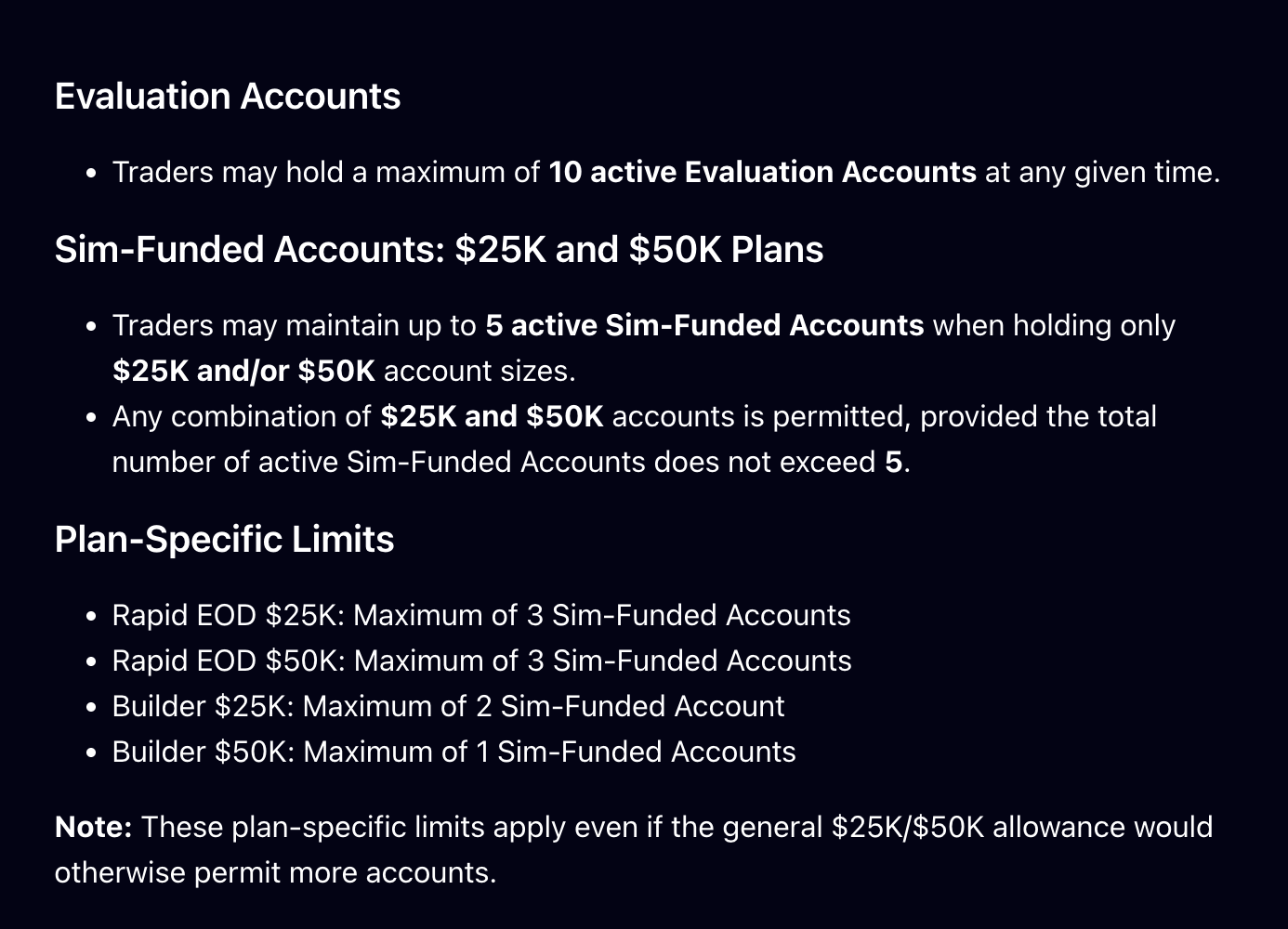
MFFU’s own examples: one 100K and two 50Ks is allowed; one 100K and four 50Ks is not. The plan caps apply even when the general 5-account allowance would permit more. Our guide on how many MyFundedFutures accounts you can have covers every case.
Bots: allowed, if they do not trade the simulator
MFFU allows automated trading under its Fair Play policy, with two conditions. Traders may use automated strategies tailored to their own settings, as long as these tools do not aim to exploit the favorable fills of the simulated environment. And high-frequency trading is not allowed on its plans.
The same policy lists what counts as exploiting the simulator, and several items describe how badly configured bots behave:
- Placing multiple limit orders at the same price to manipulate fills.
- Trading gapped or illiquid markets to profit from isolated fills.
- Using tight brackets to profit from the absence of slippage.
- Trading Tier 1 economic data releases, prohibited on Rapid and Pro Sim Funded accounts.
On live accounts, MFFU adds that automated trading must follow CME guidelines. Its live FAQ also allows microscalping and dollar-cost averaging there. Sanctions under Fair Play include immediate termination, confiscation of profits from prohibited practices, and review of passed evaluations.
Hedging: same underlying, never
MFFU prohibits hedging of any kind, which it defines as entering both buy and sell positions on the same underlying asset at the same time. Its example: the E-mini NQ and the Micro NQ share the same underlying, NQ.
Two details set MFFU apart. Its definition is narrower than Tradeify’s or Lucid’s: hedging through different, unrelated assets is permitted, though MFFU warns that relying heavily on it makes a trader hard to evaluate. And its hedging page does not say “across accounts” in so many words. Our reading: a long on one account and a short on the same underlying on another is still a trader holding both sides, which is the risk of an inverted or lagging follower. Do not test it.
A related rule catches copy setups that mix sizes: MFFU’s cross-instrument policy treats 2 minis plus 20 micros on an account limited to 2 contracts as a deliberate bypass of the scaling plan, which can breach the account even though the orders execute.
Other traders: one person, one device
MFFU’s copy permission covers your own accounts only. Its Fair Play policy states that traders are not permitted to copy trade one another, and that collaborating with others to execute identical or opposite strategies across unconnected accounts is prohibited.
It goes further on devices. Each trader may not use the same device as another trader, and breaking this can lead to permanent restrictions from its services. MFFU’s account-sharing page gives the example: a partner sharing the same PC or phone. A household copy setup run from one computer is exactly what this rule targets.
The merge to live: five accounts become one
This is where a copy grid at MFFU changes shape. MFFU states that your Sim Funded accounts will be merged into one Live Funded Account. On the Rapid plan, it explains how:
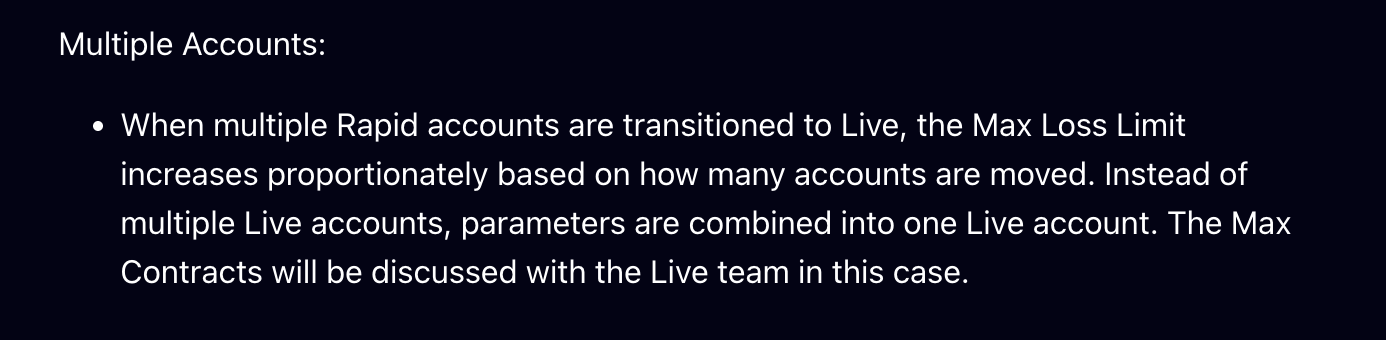
- One account, bigger limits: the Max Loss Limit increases with the number of Rapid accounts moved, and the maximum contracts are discussed with the Live team.
- Everything else pauses: on Rapid, all simulated trading accounts and additional purchases are suspended while the Live account runs, and you cannot trade sim and live at the same time.
- How you get there: on Rapid, live is automatic at $10,000 of net profit in a single session, with any profit above $10,000 that day forfeited and up to $5,000 of profits placed in the Reserve Program; the risk team can also offer a transition at any time.
- Builder: one live account maximum, and a live breach triggers a 21-day cooldown with no sim funded trading.
For a copy trader, the consequence is simple: the copier has nothing left to copy to. Five accounts become one, which is a different job from running a grid. Our MyFundedFutures Rapid plan guide covers the transition in detail.
MyFundedFutures vs Phidias on copy trading
MFFU has the broadest copy permission in this series, and a named copier partner. MFFU merges your accounts into one live account, with more only by agreement for traders with a long live track record; Phidias allows one LIVE account per trader. The difference is how you get there.
On account count, we allow more: up to 15 CASH accounts across three families, where 150K Fundamental and Premium accounts count double, against MFFU’s 5 or 3.
On the path to live, the mechanics differ. On Express to Live, you reach the target on the CASH account, click Switch to Live, and the fixed bonus payout converts the account to a LIVE account. That conversion is an Express to Live rule; on our Fundamental and Premium accounts, moving to LIVE is discretionary. If you copy trade on Phidias, our DeepCharts trade copier guide walks through the setup.
See Phidias accounts and pricing
Test: is your copy setup safe on MyFundedFutures?
Four questions on whose accounts you copy to, what happens when the copier misses, what places the lead’s trades and what you expect at live. No email.
30 second check
Is your copy setup safe on MyFundedFutures?
MyFundedFutures copy trading: frequently asked questions
Does MyFundedFutures allow copy trading?
Yes. MyFundedFutures’ help center states that it “allows copy trading across all account types”. Tradesyncer is its preferred trade copier partner, Tradovate users can use the built-in group copier, and external copy trading solutions can also be used. The trader carries full responsibility for anything the copier does.
How many MyFundedFutures accounts can you copy trade?
Up to 10 active evaluation accounts. For Sim Funded accounts, up to 5 if you only hold 25K and 50K accounts, with plan caps of 3 on Rapid EOD 25K and 50K, 2 on Builder 25K and 1 on Builder 50K. As soon as you hold a 100K or 150K Sim Funded account, the limit is 3 Sim Funded accounts in total.
Does MyFundedFutures reset an account if the copier fails?
MFFU does not owe you one. It states it is not obligated to provide technical support, troubleshooting or account resets for any issues stemming from copy trading, disclaims all liability for copy trading software, and asks users to indemnify it for losses resulting from copy trading.
Does MyFundedFutures allow bots and automated trading?
Yes, with limits. Traders may use automated strategies tailored to their own settings, as long as they do not aim to exploit the favorable fills of the simulated environment. High-frequency trading is not allowed, and on live accounts, automated trading must follow CME guidelines.
What counts as hedging at MyFundedFutures?
MFFU prohibits hedging of any kind, defined as entering both buy and sell positions on the same underlying asset at the same time. The E-mini NQ and the Micro NQ count as the same underlying. Hedging through different, unrelated assets is permitted.
Can you copy trades between two people at MyFundedFutures?
No. Traders are not permitted to copy trade one another, collaborating with others to run identical or opposite strategies across unconnected accounts is prohibited, and two traders may not use the same device, even partners sharing a PC or a phone.
What happens to copied accounts when you go live at MyFundedFutures?
They become one account. MFFU states that Sim Funded accounts are merged into one Live Funded Account; on Rapid, the Max Loss Limit increases with the number of accounts moved and the maximum contracts are discussed with the Live team. On Rapid, all simulated accounts and new purchases are suspended while the Live account runs.
Can you trade sim and live accounts at the same time at MyFundedFutures?
No. MFFU states that once you have a live account, you cannot trade on the sim and live environments simultaneously, and all simulated trading accounts are suspended during Live account operation.
How does Phidias compare on copy trading?
Phidias allows copy trading within its account limits: up to 5 CASH Premium, 5 CASH Fundamental and 5 Express to Live accounts per person, company or internet connection, with third-party copier software at your own risk. Phidias allows one LIVE account per trader; on Express to Live, the payout at the target converts the account to a LIVE account.
Related guides
Read it yourself
- MFFU: Copy Trading at MyFundedFutures
- MFFU: Fair Play and Prohibited Trading Practices (bots, collaborative trading, devices)
- MFFU: Hedging, What You Should Know
- MFFU: Moving from Evaluation to Sim Funded (account limits)
- MFFU: Understanding Rapid Live (the merge)
- MFFU: Can someone else trade my account? (shared devices)
- MFFU: Understanding the Live Funded Account
- MFFU: Cross Instrument Policy
- Phidias rules (account limits and copy trading)
The verdict
“MyFundedFutures says yes to copy trading more plainly than anyone, then hands you every consequence of it. Run your own accounts from your own device, keep them on one side of each underlying, and plan for the day the grid becomes a single live account.”
William G., CMO at Phidias Propfirm