Tradeify platforms, 2026
You do not pick a platform at Tradeify, you pick a broker connection. It is chosen at checkout, and changing it later means buying a new account.
Here is what each connection unlocks, and how to get it right the first time.
Want a funded account that pays out the same day? Here is Phidias Express to Live. First, the Tradeify platform decision.
Which Tradeify platform should you choose?
Choose the broker connection first, because that is what you are actually buying. Tradeify sells three: Tradovate, Rithmic and WealthCharts. Each one unlocks a different set of platforms, all three cost the same, and you select yours at checkout. Pick Tradovate if you want TradingView or NinjaTrader, since neither works on any other connection. Pick Rithmic if you want Tradesea, Quantower or Sierra Chart. Pick WealthCharts only if you specifically want WealthCharts.
From Tradeify’s help center Supported Platforms page, checked August 2026.
Tradeify platforms in 30 seconds
Three connections, one price: Tradovate, Rithmic and WealthCharts all cost the same. There is no surcharge for any platform.
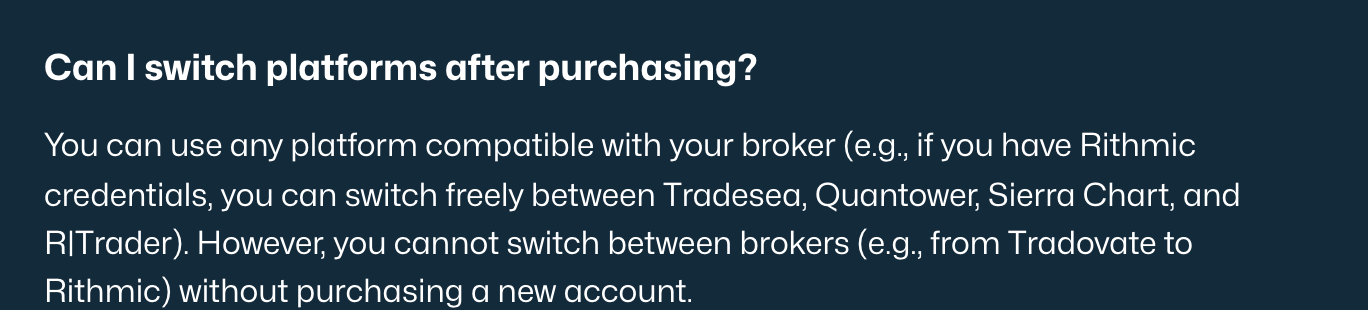
Free movement inside a connection: with Rithmic credentials you can switch between Tradesea, Quantower, Sierra Chart and R|Trader whenever you like.
No movement between them: going from Rithmic to Tradovate means buying a new account.
Our verdict (William G.)
If you are unsure, take Tradovate. It is the only connection that reaches TradingView and NinjaTrader, which covers what most futures traders actually use, and it is the hardest choice to regret. The one I would think twice about is WealthCharts: it unlocks a single third-party platform with its own separate login, so if it does not suit you, there is nothing else on that connection to fall back on.
The Tradeify choice that cannot be undone
Most prop firm platform guides list features. The more useful thing to know about Tradeify is structural: your platform access is attached to the broker connection you pick at checkout, before you have placed a single trade.
Tradeify states it plainly. On movement within a connection, its help center says you “can use any platform compatible with your broker” and switch “freely”. On movement between connections, its own platforms guide says: “To trade on a different broker connection (for example, moving from Tradesea to Tradovate), you need to buy a new account.” The reason given is that “the data routing and order flow are different”.
What the wrong click costs
Choosing Rithmic and then deciding you want TradingView does not cost a support ticket. It costs a whole new evaluation: $99 on a Growth 25K, $109 on a Select 25K, or $345 on a Lightning 25K.
Worth knowing before you buy several at once: Tradeify’s headline rate is capped by use, and their five-account bundle no longer matches that cap. The arithmetic is in our guide to the Tradeify discount code.
Worth knowing before you compare platform lists: Tradeify also sells a separate crypto program on a different platform entirely, which we cover in Tradeify Crypto.
That makes the platform dropdown the most expensive field at checkout, and it is the one nobody spends time on. It is also the reason to answer one question before anything else: do you want TradingView or NinjaTrader? If yes, the decision is already made for you.
30-second quiz
Which Tradeify broker connection should you pick?
The Tradovate connection
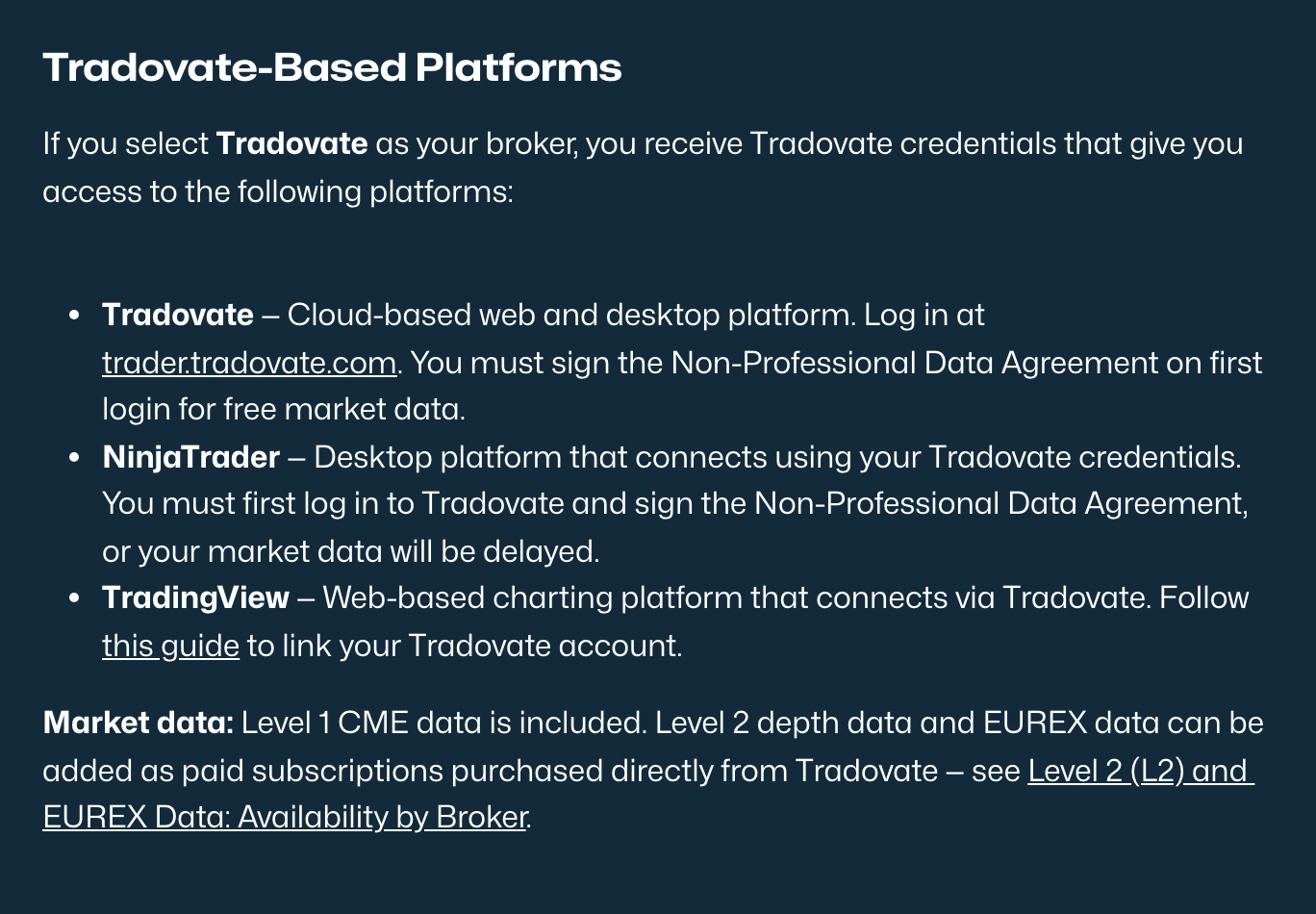
Pick Tradovate and you receive Tradovate credentials, which open three platforms:
Tradovate itself is cloud-based, running in a browser or as a desktop app, so it works from any machine without an install. NinjaTrader is the desktop platform, and it connects using your Tradovate credentials rather than its own. TradingView connects through Tradovate as an add-on, giving you TradingView’s charting with live order execution.
The step people miss. On your first Tradovate login you must sign the Non-Professional Data Agreement. If you skip it, your market data is delayed, on Tradovate and on NinjaTrader alike. Traders regularly assume the feed is broken when the agreement is simply unsigned.
This is the connection to take if you are undecided, for one reason: TradingView and NinjaTrader are exclusive to it. No other connection reaches either.
The Rithmic connection
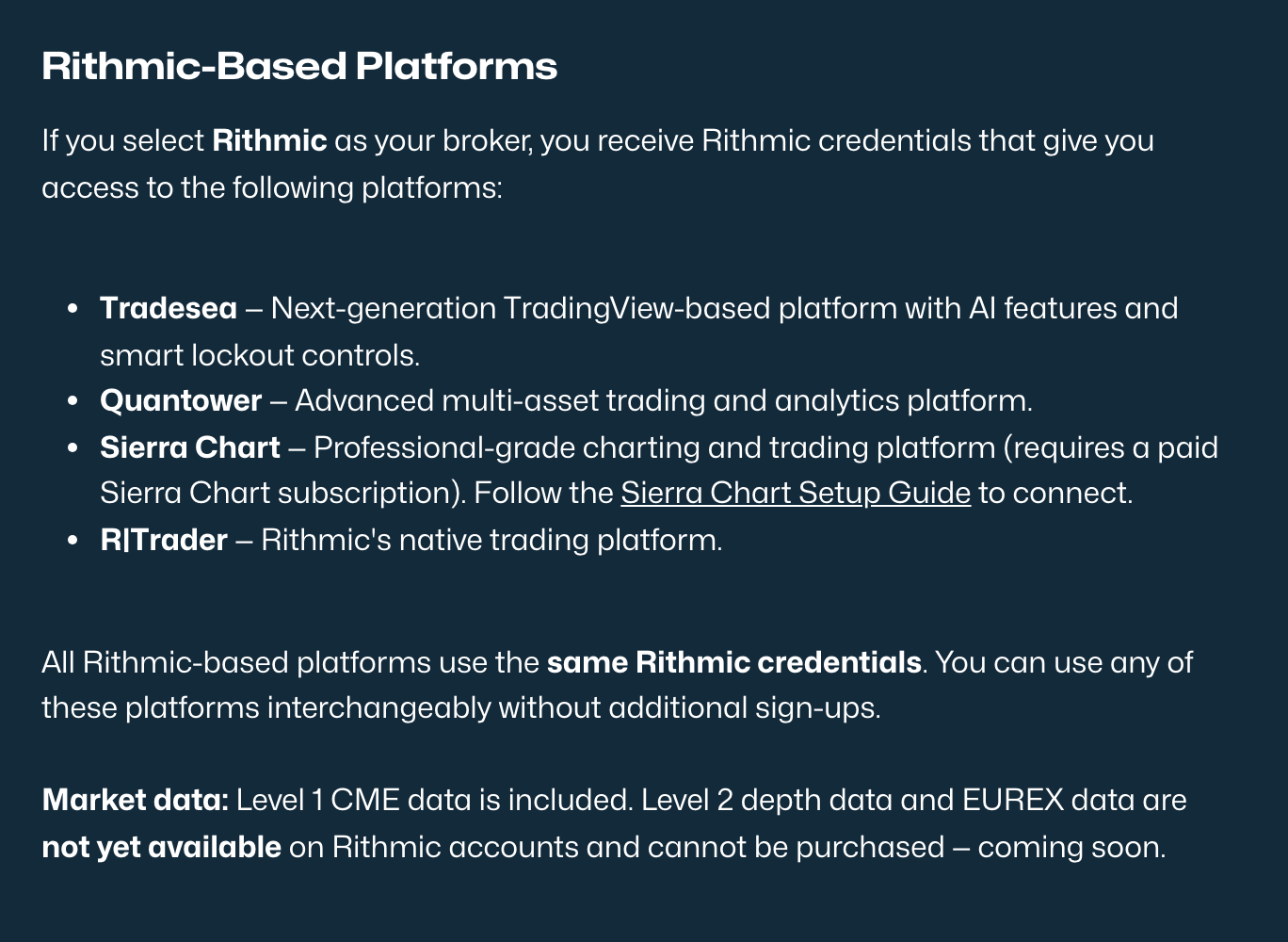
Rithmic credentials open four platforms, and Tradeify confirms they all share the same credentials so you can move between them “interchangeably without additional sign-ups”.
Tradesea is Tradeify’s newer TradingView-based platform, with AI features and smart lockout controls. Quantower is a multi-asset trading and analytics platform. Sierra Chart is the professional-grade option, and it requires a paid Sierra Chart subscription of your own, which is the one platform on this list with a cost attached. R|Trader is Rithmic’s own native platform.
Rithmic is the connection for traders who want depth of tooling on the desktop. What you give up is TradingView and NinjaTrader, permanently, on that account.
The WealthCharts connection
WealthCharts is the narrowest of the three. It gives you one platform and nothing else, it is operated by a third party, and it uses its own separate login credentials, distinct from Tradovate and Rithmic. Tradeify is explicit that WealthCharts access is included only when you select WealthCharts at checkout, and never comes bundled with a Tradovate or Rithmic account.
Take it if WealthCharts is genuinely the platform you want to trade on. Avoid it if you are curious, because there is no second option behind it.
What happened to Tradeify Project X?
If you are searching for Tradeify Project X, that is because it used to be part of the lineup. It no longer is.
Tradeify answers this directly, and the reason is not the one most people assume. Its help center FAQ says: “We offered ProjectX as a platform option for a short time. ProjectX decided to drop all of their clients, so we no longer offer that platform.”
So Tradeify did not drop ProjectX. ProjectX dropped its clients. The Supported Platforms page, last updated in May 2026, now lists only three broker connections, and ProjectX is not among the options at checkout.
If you came here for a ProjectX replacement, the closest equivalents by use case are Tradovate for a cloud-based platform that works anywhere, and Tradesea on the Rithmic connection for a modern TradingView-style interface with built-in risk controls.
One warning if you go reading further. Tradeify’s older blog-side platforms guide still describes NinjaTrader as a fourth, Elite-Live-only connection through the NinjaTrader brokerage, unlocked only after 3 payouts. That page is out of date.
The help center, the NinjaTrader 8 setup guide and the pricing reference all confirm the current position: NinjaTrader runs on Tradovate credentials on an ordinary evaluation or funded account. Tradeify itself points readers to the help center for the current list, so treat the help center as authoritative when the two disagree.
The platform costs nobody mentions
The platform itself is free in all three cases, and Tradeify does not charge more for one connection over another. Two costs sit alongside it.
Market data. Every account includes Level 1 data. Level 2 (depth of market) and EUREX access are optional upgrades, added from your Tradovate account settings, and Tradeify is clear about who charges you: “you will be billed directly by Tradovate.” That is a bill from the broker, not from the prop firm. Note this is the only depth-of-market route Tradeify documents, and it applies to the Tradovate connection: there is no published equivalent for Rithmic or WealthCharts.
Sierra Chart. Using it on the Rithmic connection requires your own paid Sierra Chart subscription. Every other platform is included at no charge from Tradeify.
TradingView. Access through the Tradovate add-on costs nothing, but Tradeify notes that free TradingView accounts run on roughly 5-second delayed data, and paid TradingView plans start at $12.95 a month, paid directly to TradingView.
And the expensive one. Skipping the Non-Professional Data Agreement does more than delay your quotes. Tradeify’s pricing reference states that if you do not sign it, “you may incur a $300/month professional data fee.” That is the costliest mistake on this page, and it is avoided by ticking a box on your first login.
The TradingView caveat worth reading before you choose
Here is a detail that sits in Tradeify’s troubleshooting documentation rather than its marketing, and it deserves to be part of the decision.
Tradeify lists the platforms it directly supports as Tradovate, WealthCharts and NinjaTrader. TradingView is not among them.
In its own words, TradingView is “a third-party software application” whose “API connectivity, software bugs, data feed problems, or other technical malfunctions are outside Tradeify’s control and support scope”, and “accounts affected by third-party software issues will not be repaired or adjusted by Tradeify.”
Read that carefully, because it interacts with everything above. TradingView is one of the strongest reasons to pick the Tradovate connection, and it is also the one platform where a technical failure is your problem, not the firm’s. If a TradingView issue contributes to a loss or a breach, the stated policy is that the account will not be adjusted.
Tradeify also flags two practical quirks: TradingView can lag the trailing drawdown figure shown in Tradovate, and its order entry can be slightly slower than native Tradovate during fast markets like the New York open.
That is not unique to Tradeify, and it is arguably more honest than firms that leave the question unanswered. But if you intend to place orders from TradingView rather than only chart on it, keep Tradovate open as your execution fallback. It is on the same credentials and costs nothing extra. Tradeify does advise sticking to one active trading session at a time, so treat it as a monitoring tab and a backup, not a second live order entry point.
The setup problems that cost people their first day
Most Tradeify connection issues are the same handful, and all of them are avoidable. From the firm’s own troubleshooting guide:
NinjaTrader shows no Tradeify or Tradovate connection. This is the big one, and it is not a bug. Neither connection type exists in NinjaTrader. In most cases you never need that list: sign in at the NinjaTrader Desktop startup screen with your Tradovate credentials and it connects automatically. Only in Multi-Provider Mode do you configure it by hand, using NinjaTrader’s own NinjaTrader connection type with Account type set to Simulation. Reinstalling will never make a Tradovate entry appear. Note too that Tradeify accounts run under Tradeify’s NinjaTrader company licence, not your personal one.
Choosing the wrong environment. Tradeify accounts are simulated, so you must select Demo or Simulation. Selecting Live will not connect.
Invalid credentials that are actually valid. Copy and paste them from the top of your Tradeify dashboard rather than typing. Tradeify warns that the password starts with a capital letter and that some platforms silently lowercase the first character on paste.
Delayed quotes. Sign the Non-Professional Data Agreement on your first Tradovate login. Until you do, data stays delayed in Tradovate and NinjaTrader alike.
None of these are difficult, but each one can burn the session you were planning to pass your evaluation in. Set the platform up and confirm a live quote before the day you intend to trade.
Which Tradeify connection for which trader
You chart on TradingView: Tradovate. There is no alternative route, on any other connection.
You trade on NinjaTrader: Tradovate, using your Tradovate credentials to log in.
You want to trade from any device without installing anything: Tradovate, which is cloud-based.
You use Sierra Chart or Quantower: Rithmic, and budget for the Sierra Chart subscription if that is your choice.
You want lockout controls to protect you from yourself: either works. Tradesea on Rithmic has smart lockout controls built into the platform, and Tradovate offers Manual Lockout through Tradovate Web Trader and NinjaTrader Mobile, enforced across every platform on the connection.
You already trade on WealthCharts: WealthCharts. Otherwise, do not.
One last practical note. The broker is chosen per account at checkout, so nothing in Tradeify’s published rules ties every account you own to a single connection. Tradeify does not spell this out either way, so confirm with support before buying on that basis. If it holds, two accounts on two connections is the only way to have both TradingView and Sierra Chart.
The decision that matters more than the platform
6 hours 18 minutes.
That is the Phidias record from buying the evaluation to receiving a payout. With Express to Live the entire cycle, buy, pass, get funded, get paid and convert to a real LIVE account with our brokerage partner, can happen the same day.
Platform choice is worth getting right, and Tradeify’s line-up is genuinely broad. But it is worth keeping in proportion: a charting package does not decide whether you get paid, and it certainly does not decide whether you ever reach real capital.
On Phidias Express to Live, the evaluation has no consistency rule and no minimum trading days, the drawdown is static so it never trails, $500 on the 25K, and your first payout converts the account into a real LIVE account with daily, uncapped withdrawals. Conversion is a product rule, not a selection process. Express to Live runs on the Tradovate umbrella, which covers Tradovate, NinjaTrader and TradingView, so the platforms most traders want are on the standard path rather than behind an irreversible checkout choice.
Frequently asked questions
What platforms does Tradeify support?
Three broker connections. Tradovate unlocks Tradovate, NinjaTrader and TradingView. Rithmic unlocks Tradesea, Quantower, Sierra Chart and R|Trader. WealthCharts unlocks WealthCharts only. You choose one at checkout.
Can you change your Tradeify platform after buying?
Within a connection, yes and freely. Between connections, no. Tradeify states that moving to a different broker connection requires buying a new account, because the data routing and order flow differ.
Can you use TradingView with Tradeify?
Yes, but only on the Tradovate connection, via the Tradovate add-on. TradingView is not available on a Rithmic or WealthCharts account.
Can you use NinjaTrader with Tradeify?
Yes, on the Tradovate connection only. NinjaTrader logs in with your Tradovate credentials, not separate NinjaTrader ones. Sign the Non-Professional Data Agreement in Tradovate first or your data will be delayed.
Does Tradeify still support Project X?
No. Tradeify’s help center states that ProjectX “decided to drop all of their clients, so we no longer offer that platform.” The Supported Platforms page now lists only Tradovate, Rithmic and WealthCharts. The nearest replacements are Tradovate for cloud access and Tradesea for a modern charting interface.
Do Tradeify platforms cost extra?
No. All three connections are the same price and there is no surcharge for any platform. Three costs sit outside Tradeify: Sierra Chart needs your own paid subscription, Level 2 or EUREX data is billed directly by Tradovate, and failing to sign the Non-Professional Data Agreement may incur a $300 a month professional data fee.
Why is my Tradeify market data delayed?
Most often because the Non-Professional Data Agreement has not been signed. Tradeify requires you to sign it on your first Tradovate login to receive free live data, and an unsigned agreement leaves quotes delayed in both Tradovate and NinjaTrader.
Does Tradeify support TradingView if something goes wrong?
No. Tradeify lists Tradovate, WealthCharts and NinjaTrader as directly supported and describes TradingView as third-party software whose technical failures are “outside Tradeify’s control and support scope”, adding that affected accounts will not be repaired or adjusted. You can still trade on it, but keep Tradovate as an execution fallback.
Why is there no Tradeify connection in NinjaTrader?
Because there is not supposed to be one. NinjaTrader has no Tradeify and no Tradovate connection type. Most people never need that list: NinjaTrader Desktop shows a login screen at startup, and your Tradovate credentials connect you automatically. Only in Multi-Provider Mode do you configure it manually, choosing NinjaTrader’s own NinjaTrader connection type and setting Account type to Simulation. Reinstalling will not add a Tradovate entry.
Which Tradeify platform is best for beginners?
Tradovate. It is cloud-based so there is nothing to install, it works on any device, and it keeps the door open to both TradingView and NinjaTrader as you develop. It is the hardest of the three choices to regret.
Useful resources
Tradeify: Supported Platforms, the official list of broker connections and what each unlocks.
Tradeify: Level 2 and EUREX data, how to add depth of market, and who bills you for it.
Tradeify: Common FAQs, the source for what happened to ProjectX.
Phidias Express to Live, the same-day path from evaluation to a real LIVE account.
Related guides
Tradeify Review 2026, the full breakdown of the firm, its three plans and its live program.
Tradeify Select Account 2026, the permanent Daily vs Flex choice and the drawdown that locks.
Tradeify Growth Account 2026, the rules and costs, and why the payout threshold sits above the cap.
Tradeify Payout Rules 2026, every payout condition across the three plans.
About the author
William G.
William G. is a futures trader and prop firm analyst at Phidias Propfirm. He tests competitor rule sets against their own published documentation, and writes about what actually happens between passing an evaluation and being paid. Every detail in this guide is taken from Tradeify’s own help center and platforms guide, checked in August 2026.