MyFundedFutures live account, 2026
MFFU’s live account is a real brokerage account with daily payouts. On Rapid it starts at a $0 balance, part of your sim profit is held back as a reserve, and you cannot say no to it.
Read from MyFundedFutures’ help center and plan pages on 6 October 2026.
We are a competing prop firm, so read our comparison at the end with that in mind. Everything before it is MyFundedFutures’ own documentation, linked at the bottom.
The MyFundedFutures (MFFU) live account is a real brokerage account that traders move to from the simulated funded stage, by a profit trigger, a payout count or a Risk Team decision depending on the plan. The move cannot be refused, and all your sim accounts are merged into one live account. On the Rapid plan, it opens at a $0 balance, with up to $5,000 of your sim profits held in a Reserve Program behind it.
In short
- How you get there: Rapid at $10,000 net in one session or by review; Builder after the 5th payout; Pro after three consecutive payouts and a review.
- No opt-out: rejecting the move is not possible; sim accounts go dormant and merge into one.
- The $0 start: Rapid live opens at $0 with a max loss that trails up to $0; up to $5,000 of sim profit sits in a Reserve.
- Payouts: daily, $250 minimum, one request a day before 11 AM EST, contracts at 0 until paid. 90/10 on Rapid, 80/20 on Builder and Pro.
- Costs: CME data, commissions and platform come out of your live balance.
What is the MyFundedFutures live account?
It is the stage where MFFU stops simulating. In its own words, a live account involves a real brokerage account and trades on the live markets, and traders now manage actual capital on behalf of MyFundedFutures. The Pro plan page names Blue Row Capital as the live brokerage MFFU traders move into.
MFFU lists four features of the live account: a static drawdown, a customizable daily loss limit, scaling opportunities and a dedicated support team. It also publishes how many traders reach it: across its programs, 4.2% of participants trading a simulated funded account were promoted to a live funded account, according to the statistics at the foot of its plan pages, over a measurement period it does not specify.
How you get there, plan by plan
Each MFFU plan has its own route to live, and all three leave room for the Risk Team to act on its own.
Our guides on the Rapid plan and the Pro plan cover each route in detail.
You cannot say no
Once MFFU decides to move you, the move happens. Its help center answers the question directly:
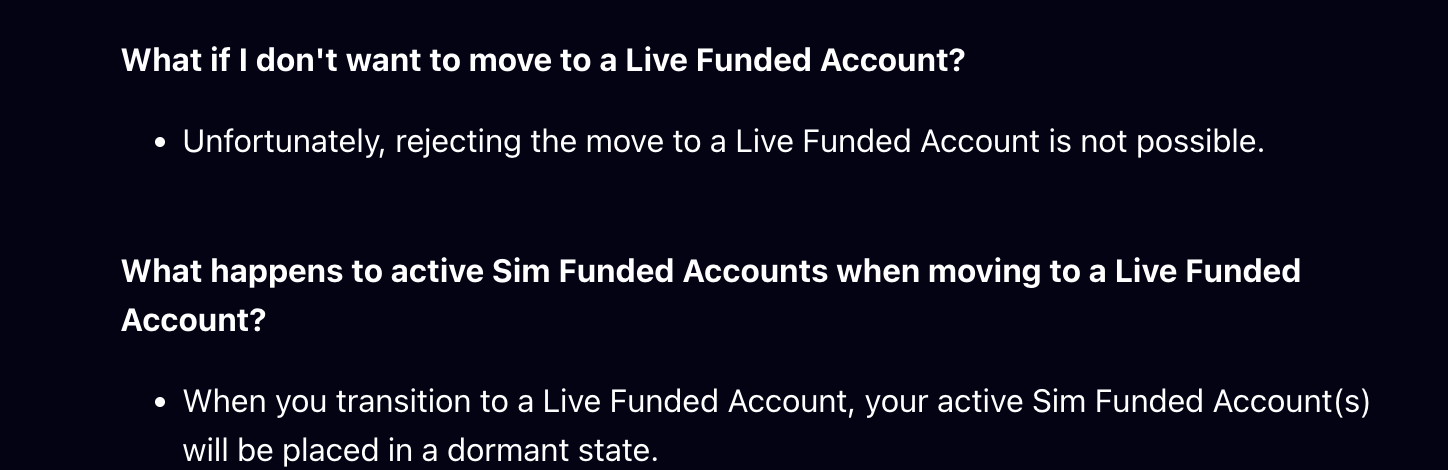
- No opt-out: rejecting the move to a Live Funded Account is not possible.
- Sim accounts go dormant: your active sim funded accounts are placed in a dormant state; an evaluation you have just passed is put on hold, or its fee can be refunded.
- One account: several sim funded accounts are merged into a single live account. On Rapid, the max loss limit grows with the number of accounts moved.
- No sim alongside: on Rapid, all simulated accounts and new purchases are suspended while the live account runs, and you cannot trade sim and live at the same time.
For traders who run several accounts with a copier, our MyFundedFutures copy trading guide explains what that merge means in practice.
Why the Rapid live account starts at $0
This is the part most traders do not expect. A Rapid sim funded account showing $50,000 does not become a $50,000 live account:
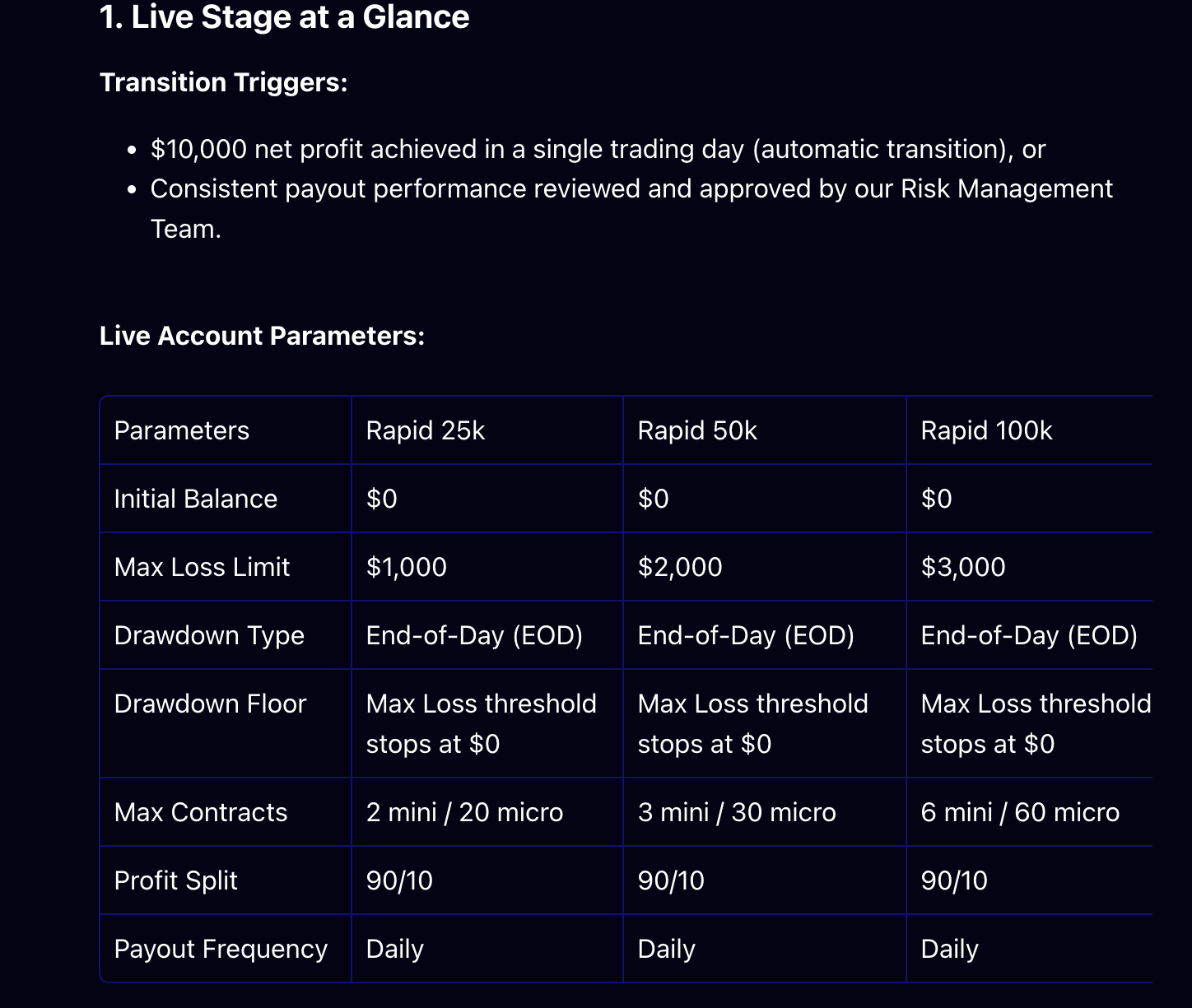
MFFU states it plainly: Rapid live accounts start at $0, so the balance may go negative until the max loss limit trails up to $0. The live account is not funded from your sim balance; what stands behind it is your own sim profit, held in the Reserve Program.

MFFU’s own example. A Rapid trader makes $10,000 of net profit in one day, which triggers the automatic move to live. Of that $10,000, $5,000 goes to the Reserve and $5,000 can be withdrawn under the normal payout rules. The live account opens at $0. The Reserve comes back to the trader as a Performance Bonus only after 20 profitable live days and $10,000 of cumulative gross live payouts; if the live account breaches first, the Reserve covers the negative balance.
The three live accounts side by side
MFFU’s live account is not one product: its terms depend on the plan you came from.
The Rapid live account has the best split. The Pro live account is the only one that opens with a balance, and that balance comes from your own sim profits, either the excess above the $100,000 cap or a payout you allocate to it; you can only withdraw above it until 20 winning days and 3 payouts unlock it. Builder sits between, with a daily loss limit and no consistency rule.
Live payout rules
Live payouts are daily, and they come with a routine. MFFU’s live FAQ sets it out:
- One request a day. Payouts are processed once a day by MFFU’s partner FCM, so multiple requests in a day are not possible.
- Before 11 AM EST for same-day processing; later requests usually go out the next business day.
- Contracts at 0. Once you request a payout, your available contracts are set to 0 until it is approved and paid.
- $250 minimum, and on your first live day, a request only after the end of the day.
MFFU’s live FAQ also allows microscalping, dollar-cost averaging and news trading on live accounts, with warnings on each, and closes positions automatically before 4:10 PM EST without breaching the account. Hedging remains prohibited.
What you pay on a live account
On the live account, the running costs are yours.

The CME professional data subscription, round-trip commissions and the platform license are deducted directly from the live balance. There is no inactivity rule on live, but the data fee is still charged on the first trading day of each month, whether you trade or not.
When a live account breaches
Reaching the max loss limit closes the live account immediately, and MFFU documents what happens next:
Steps 1 to 3 come from MFFU’s Rapid Reserve page; the 21-day cooldown also applies to Builder. MFFU’s example: with $5,000 in Reserve and a live account closed at minus $1,500, the $1,500 is taken from the Reserve and the remaining $3,500 goes back to the sim account for withdrawal.
MFFU live vs Phidias LIVE
MFFU’s Rapid live account pays a better split than ours, and its Pro live balances are larger than our LIVE credits. We say so. The difference is how the account is reached and what it holds on day one.
On Express to Live, you reach the target on the CASH account, click Switch to Live, and the fixed bonus payout converts the account to a LIVE account: on the 50K, $2,000 of bonus, $1,600 to you at 80/20, and a $1,000 LIVE credit. Payouts on LIVE are available every day with no cap and no consistency rule. Market data on a LIVE account through NinjaTrader is also charged to the account, so read the fees on both sides. On our Fundamental and Premium accounts, moving to LIVE is discretionary.
See Phidias accounts and pricing
Test: are you ready for MFFU’s live account?
Four questions on your plan, what you expect your live balance to be, how you take payouts and what you would do if MFFU called you up. No email.
30 second check
Are you ready for MFFU's live account?
MyFundedFutures live account: frequently asked questions
What is the MyFundedFutures live account?
A real brokerage account traded on the live markets, which MFFU moves traders to from its simulated funded stage. MFFU states that live traders manage actual capital on behalf of the firm. The Pro plan page names Blue Row Capital as the live brokerage relationship.
How do you get a live account at MyFundedFutures?
It depends on the plan. On Rapid, live is automatic at $10,000 of net profit in a single session, or follows a Risk Team review. On Builder, you become eligible after your 5th approved sim payout. On Pro, three consecutive payouts or a $20,000 profit milestone trigger a review. The Risk Team can also offer a transition at any time.
Can you refuse the MFFU live account?
No. MFFU’s help center states that rejecting the move to a Live Funded Account is not possible. Your active sim funded accounts are placed in a dormant state and merged into one live account.
Why does the MFFU Rapid live account start at $0?
MFFU’s Rapid live accounts have an initial balance of $0 and an end-of-day max loss limit of $1,000 to $4,500 that trails up and stops at $0, so the balance can go negative at first. Up to $5,000 of your sim funded profits are held in a Reserve Program, which offsets a negative balance if the live account breaches.
What is the MFFU Reserve Program?
On the Rapid plan, when you move to live, up to $5,000 of your sim funded profits are held in reserve. The reserve is paid to you as a Performance Bonus once you reach 20 profitable trading days on the live account and $10,000 of cumulative gross live payouts. If the live account breaches first, the reserve covers the negative balance and the rest is returned to your dormant sim account for withdrawal.
What are the MFFU live account payout rules?
Payouts are daily, with a $250 minimum. Requests must be sent before 11 AM EST to be processed the same day, only one request per day is possible, and your contracts are set to 0 between the request and the payment. On your first live day, you can only request after the end of the day.
What is the profit split on the MFFU live account?
90/10 on Rapid live accounts, and 80/20 on Builder and Pro live accounts.
Who pays the costs on an MFFU live account?
The trader. MFFU lists the CME professional data subscription, round-trip commissions and fees, and the platform license or subscription, all deducted directly from the live account balance.
What happens if your MFFU live account breaches?
The live account closes. On Rapid, the reserve covers any negative balance, the remainder goes back to the dormant sim account for withdrawal only, part of the sim buffer can be withdrawn (50% under 30 trading days, 80% above), and a 21-day cooldown blocks sim trading and new purchases.
Related guides
Read it yourself
- MFFU: Understanding the Live Funded Account (features, costs, transition)
- MFFU: Understanding Rapid Live
- MFFU: Reserve Program and Performance Bonus
- MFFU: Comprehensive FAQ, Live Accounts
- MFFU: Builder Plan 50K guide (Builder live)
- MFFU: Pro Plan Sim-Funded and Live Account Highlights
- Phidias accounts and pricing
The verdict
“MFFU’s live account is a real one, with daily payouts and, on Rapid, a 90/10 split. Go in knowing three things: it can open at $0, part of your sim profit is held back until you prove yourself live, and once you are selected, you cannot stay on sim.”
William G., CMO at Phidias Propfirm