Take Profit Trader platforms, 2026
Take Profit Trader lists 14 platforms, but they sit behind two feeds. Pick CQG and you get three. Pick Rithmic and you get eleven.
Five are free during the Test. The free TradingView plan is the one to think twice about, and Take Profit Trader says why itself.
Comparing prop firms on tooling? Phidias Express to Live is the alternative we build. First, exactly what Take Profit Trader offers and what each option costs you.
What platform does Take Profit Trader use?
Take Profit Trader does not have its own platform. It gives you a data feed, either CQG or Rithmic, and you connect the third-party platform of your choice to it. CQG supports TradingView, NinjaTrader and Tradovate. Rithmic supports eleven others, including Bookmap, Quantower, MultiCharts and R|Trader. You pick the feed when you sign up.
Our verdict (William G.)
We compete with Take Profit Trader, so read this knowing that. On platform choice they are genuinely generous: fourteen options, five free during the Test, and no proprietary terminal you are forced into. The decision that actually binds you is the feed, and it is made at checkout before you know it matters. Switching platforms inside a feed needs no approval and no notice to the firm, though on Rithmic it may mean buying and installing new software. Switching feeds is not something the documentation offers at all. Choose the feed for the platform you will still want in three months.
The full list, and which side each platform sits on
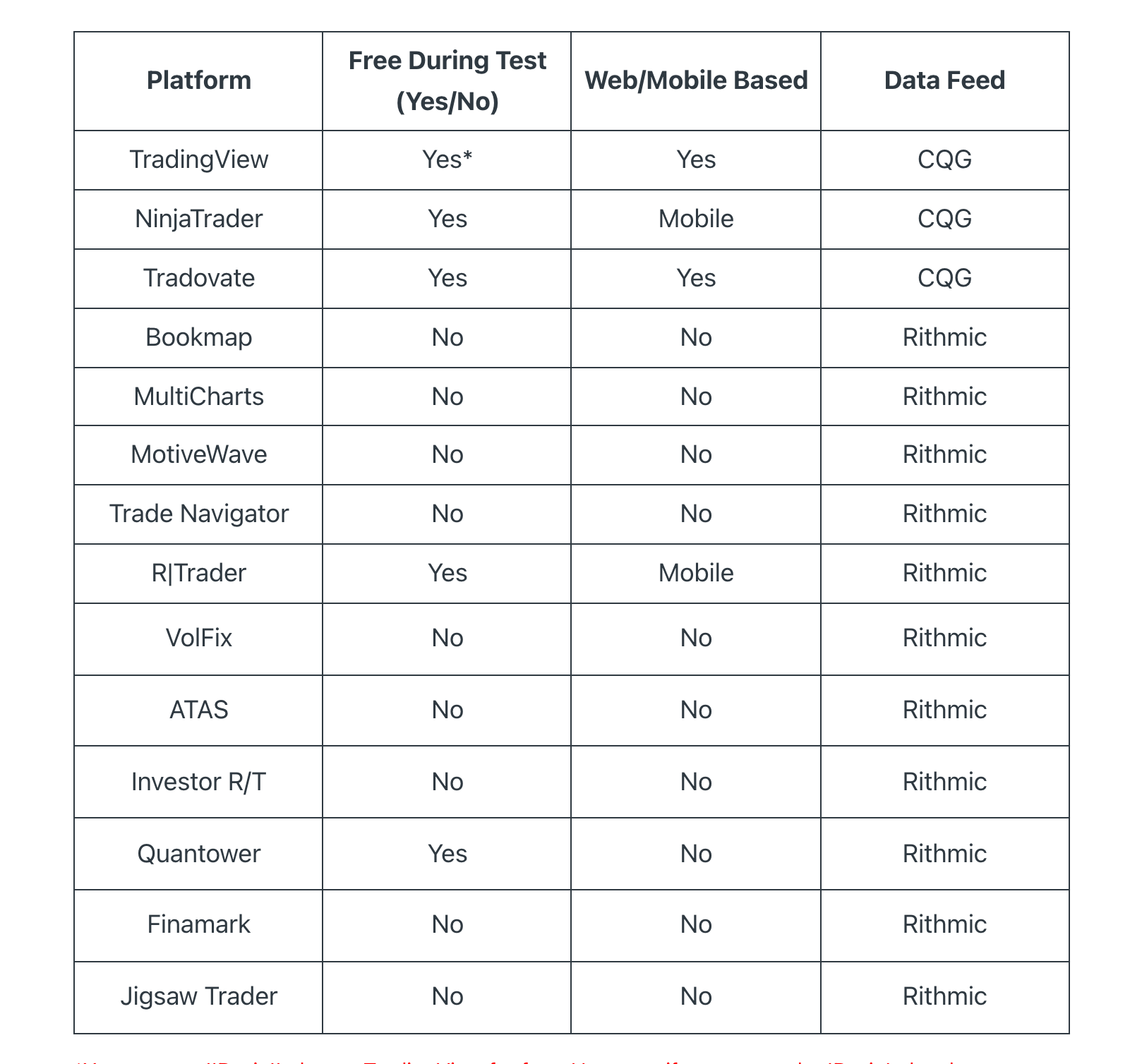
Three platforms run on CQG: TradingView, NinjaTrader and Tradovate. Those are the three most traders have heard of, and all three are free during the Test.
Eleven run on Rithmic: Bookmap, MultiCharts, MotiveWave, Trade Navigator, R|Trader, VolFix, ATAS, Investor R/T, Quantower, Finamark and Jigsaw Trader. This is the specialist side: order flow, footprint charts, market depth tooling.
The two things the table tells you at a glance
Only five are free during the Test: TradingView (with a caveat), NinjaTrader, Tradovate, R|Trader and Quantower. The other nine need a licence you buy yourself, on top of your subscription.
Only four are marked web or mobile based: TradingView and Tradovate as Yes, NinjaTrader and R|Trader as Mobile. The remaining ten are marked No. TradingView is the one Take Profit Trader documents explicitly, describing it as web based and also available as a mobile app on iOS 14 or later and Android 7 or later. If you expected to manage positions away from a desktop, that narrows fourteen options down to four.
Note that the free-and-mobile combination is not a Rithmic weakness. R|Trader and Quantower are both free during the Test and both run on Rithmic, so choosing Rithmic does not mean paying for software. It means the popular browser-based options are off the table.
Read that table as a single question: do you need a browser, or do you need order flow? Almost every trader falls clearly on one side, and once you know which, the platform picks itself.
One row deserves more than a cell, because it is the hardest constraint on the page and almost nobody mentions it. Take Profit Trader does not offer market depth on CQG accounts at all. Their words: level 2 market data is free on one exchange, each additional exchange costs $15 a month, and this is only for Rithmic accounts.
So if you read the order book, the decision is already made for you. No amount of platform switching inside CQG will produce a depth ladder, because the data is not there to begin with.
The catch on TradingView’s free plan
TradingView carries the only asterisk in Take Profit Trader’s table, and it is worth reading in full, because it is a rare case of a firm warning you about its own free option.
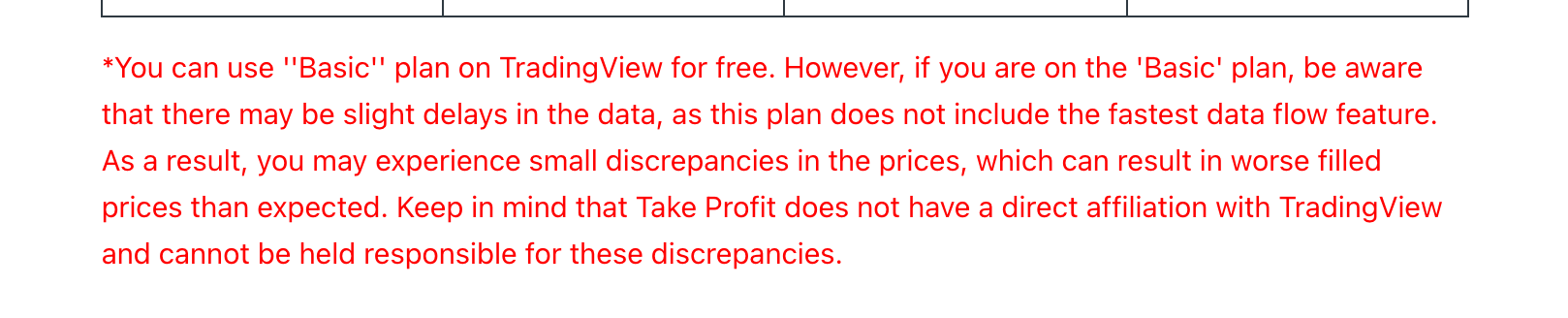
The free route is the TradingView Basic plan. Take Profit Trader states that Basic does not include the fastest data flow, that you may see slight delays and small price discrepancies, and that this can result in worse filled prices than expected.
They also disclaim it: Take Profit Trader says it has no direct affiliation with TradingView and cannot be held responsible for those discrepancies.
That matters more here than it would on a personal account. You are trading against a trailing drawdown where a handful of ticks decides whether the account survives, and you are paying commission on every round trip. A worse fill is not a rounding error, it is a direct hit to the only number the firm measures you on. If you are scalping, budget for a paid TradingView plan or take Tradovate instead, which is free without the asterisk.
How to connect NinjaTrader, Tradovate or TradingView
All three sit on CQG, and the setup runs through the same activation. There is a wrinkle worth knowing before you start: your CQG account issues you Tradovate credentials. The feed is CQG, the login you are handed is Tradovate’s.
1. Log in to your Take Profit Trader dashboard and find your CQG subscription. It shows as Pending until activation is finished.
2. Open the account to reveal your Tradovate credentials. Clicking a credential field copies it.
3. Go to tradovate.com and log in with them.
4. Sign the Market Data Agreement and select Non-Professional. Enter your first and last name exactly as they appear above the field.
5. The status flips from Pending to Active.
For TradingView specifically, you then open Supercharts, click Trade, find Tradovate in the broker list, and here is the step people miss: make sure the Demo environment is selected before clicking Connect. Paste the same Tradovate credentials into the verification window and your accounts appear in the trading panel below the chart.
TradingView also runs as a mobile app, on iOS 14 or later and Android 7 or later.
How to connect a Rithmic platform
Rithmic activation runs through Rithmic Trader Pro, available as a download or a web app. Same starting point: wait for the account to move from pending to active, then take the credentials from your dashboard.
Two details decide whether this works first time. You enter the credentials into both fields, order and market data, not just the first one. And you must select Rithmic Paper Trading as the system for both, then pick the gateway closest to you, for example Chicago Area.
Then you sign the market data agreements, as with CQG.
NinjaTrader is the one platform that works either way
Here is a detail the table does not show, and it is the single most useful thing on this page if you are undecided.
The platform table lists NinjaTrader under CQG. But Take Profit Trader publishes connection guides for NinjaTrader on both feeds: one for NinjaTrader 8 with CQG, and a separate one for NinjaTrader 8 with Rithmic. No other platform in the list has that.
So if you cannot decide, or you think your needs might change, NinjaTrader is the hedge. It is documented on whichever side you end up choosing, and on the CQG row where it appears in the table it is free during the Test.
The two routes differ in one respect worth knowing before you start. On CQG, you use your Tradovate username and password, and if you do not already have the application you download it from inside tradovate.com. On Rithmic, you register your own NinjaTrader account first, confirm your email and create a username, then connect with your Rithmic credentials. The Rithmic route has more steps because the account is yours rather than issued to you.
Where your credentials live, and what happens when you pass
Your logins are not emailed to you and then lost. Take Profit Trader keeps them in the dashboard, next to your account balance: your Rithmic or CQG credentials and your NinjaTrader licence key sit there permanently as a reminder.
That matters more than it sounds, because of what happens at the end of the Test. The platform credentials and licence key for your PRO account are the same ones you used for your test account. There is no second setup, no new download, no reconnection. You pass, the account changes, and your platform keeps working.
It also means that if you bought a licence for a Rithmic platform during the Test, that spend carries into the funded account rather than being written off.
If the connection will not go through
Did you buy at the weekend? Take Profit Trader states that an account registered over the weekend stays Pending until the markets reopen, which is Sunday at 5 PM Central. Nothing is broken and there is nothing to fix.
On CQG, Pending is normal and you can proceed. For a first CQG account you sign the market data agreements, and the status changes to Active by itself within 10 to 15 minutes.
On Rithmic, wait for Active before connecting. The status flips once Take Profit Trader receives confirmation from Rithmic that the account was created, typically 10 to 15 minutes. Beyond that, contact Live Chat.
Then check the obvious two. On Rithmic the credentials go into the order field and the market data field, with Rithmic Paper Trading selected on both. On TradingView, the Demo environment must be selected when you connect Tradovate.
Whichever feed you pick, you are logging into a paper account
This is the part the connection guides tell you without commenting on it, and it is worth stating plainly.
On the Rithmic side, the instruction is to select Rithmic Paper Trading. On the CQG side, TradingView asks you to select the Demo environment. Neither of these is a mistake or a temporary setting. Take Profit Trader Test and PRO accounts run in a simulated environment, and the platform login reflects that accurately.
It also explains the Non-Professional election, which both feeds ask for when you sign the market data agreements. You are being onboarded as a retail non-professional user of the data, which is consistent with a simulated account.
None of this makes the money less real: you are paid on the profit you make. But if you were expecting a live brokerage login, the connection screen is the first place you will notice otherwise. We go through what that actually means for fills, payouts and the tier above it in our guide to the Take Profit Trader PRO account.
You can switch platforms without asking permission
A genuinely good piece of policy, and one most traders never find out about. Within your chosen data feed, you can move between compatible platforms during your subscription, and Take Profit Trader says there is no need to inform them. Just follow the connection instructions for the new one.
So a CQG trader can start on Tradovate, decide the charting is not enough, and move to TradingView the same afternoon at no cost. A Rithmic trader can try Quantower, then R|Trader, then Bookmap if they buy the licence.
What the documentation does not describe is switching from CQG to Rithmic, or back. That is the reason to treat the feed as the real decision and the platform as a preference you can revise.
How to pick, in one line each
Choose CQG if you want browser-based trading, TradingView charting, or a platform you can open on any machine without installing anything.
Choose Rithmic if you trade order flow, want Bookmap or ATAS or Jigsaw, or already own a licence for one of the eleven.
If you are unsure, CQG is the safer default: three well-known platforms, all free, two of them in a browser, and one with a mobile app.
Native copier tools are allowed, which affects your platform choice
If you intend to run more than one account, the platform decision carries one more consequence. Take Profit Trader’s copier policy approves platform-native copier tools by name, listing Tradovate, NinjaTrader, MotiveWave and Quantower among them.
That means the copier capability is available on both feeds, but the policy names four platforms and does not name the rest. Bookmap and Jigsaw Trader are not among them, and the list ends with an explicit etc, so treat the four as documented rather than exhaustive. If multi-account trading is the plan, pick a platform whose native copier is named rather than adding a third-party tool you then have to check against the approved list.
The rules around this are strict and worth reading before you connect anything, since the penalties reach profit forfeiture and permanent removal. We cover them in full in our guide to Take Profit Trader copy trading.
Which data feed should you pick?
Four questions on where you trade from, what you need on screen, whether you would pay for software, and how many accounts you expect to run. The check names the feed that fits, which is the one decision here you cannot revise. No email.
40-second check
CQG or Rithmic? Pick the feed before you pick the platform
How we handle this at Phidias
Take Profit Trader has built a genuinely broad set of integrations, and we are not going to pretend otherwise. What we do differently is further upstream.
Phidias Express to Live converts to a live account at your first payout, so graduating out of the simulated stage is a published rule rather than an invitation you wait for. There is no monthly subscription running underneath it either, which means the time you spend learning a platform is not being metered.
Our record
Bought, passed, funded, paid out and trading live capital. In a single day. One purchase, and no paper environment in between.
Take Profit Trader platforms: frequently asked questions
What platform does Take Profit Trader use?
None of its own. Take Profit Trader provides a data feed, CQG or Rithmic, and you connect a third-party platform to it. Fourteen platforms are supported in total, three on CQG and eleven on Rithmic.
Can you use Take Profit Trader on TradingView?
Yes, on the CQG feed. TradingView connects through the Tradovate broker integration with the Demo environment selected, using the Tradovate credentials from your Take Profit Trader dashboard. It works on the free Basic plan, with delayed data.
How do I connect Take Profit Trader to NinjaTrader?
NinjaTrader runs on the CQG feed. Activate the feed from your dashboard, sign the Market Data Agreement selecting Non-Professional, and use the credentials issued there. NinjaTrader is free during the Test and also has a mobile app.
Does Take Profit Trader use Tradovate?
Yes. Tradovate is one of the three CQG platforms, it is free during the Test, and it runs in a browser. Your CQG subscription issues Tradovate credentials, which are also what TradingView uses to connect.
Which Take Profit Trader platforms are free?
Five are free during the Test: TradingView on the Basic plan, NinjaTrader, Tradovate, R|Trader and Quantower. The other nine require a licence you buy separately.
Is the free TradingView plan good enough?
It works, but Take Profit Trader warns that the Basic plan lacks the fastest data flow, which can produce small price discrepancies and worse filled prices than expected. They also state they have no affiliation with TradingView and cannot be responsible for it. For scalping, pay for a higher plan or use Tradovate instead.
Can I change platform after I start?
Yes, within your data feed, and Take Profit Trader says there is no need to inform them. Just follow the connection instructions for the new platform. Moving between the two feeds is not described in the documentation.
What is the difference between CQG and Rithmic here?
CQG carries the three mainstream platforms, TradingView, NinjaTrader and Tradovate, all free and two of them browser-based. Rithmic carries eleven specialist platforms including Bookmap, ATAS and Jigsaw, of which R|Trader and Quantower are free.
Can I trade Take Profit Trader from my phone?
On four of the fourteen. TradingView and Tradovate are browser-based so they work on mobile, and NinjaTrader and R|Trader have mobile apps. The other ten are desktop software.
Why does my platform say demo or paper trading?
Because Test and PRO accounts run in a simulated environment. Take Profit Trader’s own instructions tell you to select the Demo environment on TradingView and Rithmic Paper Trading on Rithmic. Your profits are still paid out.
Useful resources
Take Profit Trader’s own documentation
· Activating Your CQG Data Feed
· Activating Your Rithmic Data Feed
· Connecting TradingView with Your CQG Account
· Connecting NinjaTrader 8 with CQG
· Connecting NinjaTrader 8 with Rithmic
· My Trading Account Status Says Pending
Related guides
· Take Profit Trader explained: accounts, rules and payouts
· Take Profit Trader rules: the three rulebooks
About the author
William G. is CMO at Phidias Propfirm. He writes the firm’s competitor analyses from primary sources: help centres, terms of service and published policies, never aggregator sites. Every detail on this page was read from Take Profit Trader’s own documentation in August 2026. The principal sources are linked above.